
Every sentence you confirm is stored, ranked and offered back the next time it appears in this file, in next month's update, in another client's project. Re-translation costs drop by up to 60%.
Every sentence you confirm is stored, ranked and offered back the next time it appears in this file, in next month's update, in another client's project. Re-translation costs drop by up to 60%.
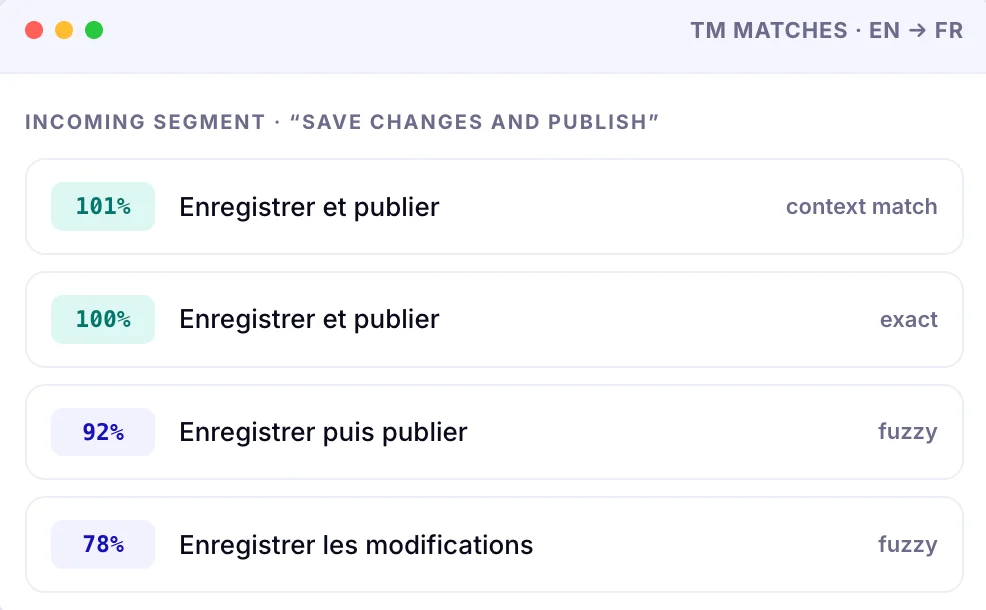
Ranked matches surface the instant you enter a segment, with one click to insert and the difference highlighted.
Confirm a segment once and every identical segment in the file updates with it automatically.
Memory is shared across projects and clients, so consistency and savings compound over time rather than resetting each job.
A neural TM that captures tone and terminology, not just string pairs — so suggestions read like you wrote them.
Approved terminology is enforced alongside the memory, and deviations are flagged in context.
SOC 2 Type II certified, GDPR compliant, EU data residency by default. Your content never trains public models.
| What matters | Spreadsheet & search | Legacy TMS | WordBeam |
|---|---|---|---|
| Finding a past translation | Ctrl+F across old files | Search inside the tool | Ranked matches as you enter the segment |
| Fuzzy matches (similar, not identical) | None | Yes | Yes, with the difference highlighted |
| Auto-propagation of repeats | Manual copy-paste | Usually | Confirm once, applied file-wide |
| Reuse across clients and projects | Whatever you remember | Per-project, often per-tier | Shared across every project |
| Learns your tone and terminology | — | Static database | Neural TM, adapts to your voice |
| Terminology enforcement | A second spreadsheet | Add-on module | Term base included |
| Quality checks against the memory | — | Batch report at the end | Live, on every keystroke |
| Who owns the data | You | Often the platform or the client | You never used to train public models |
| Cost model | Free, paid in your hours | Per seat, annual contract | From $30/month, pay per word |
Translation memory software stores every sentence you translate as a source-and-target pair, then automatically offers that translation back whenever the same or a similar sentence appears again.
It is not machine translation. Nothing is generated: the suggestions are your own previously approved work, ranked by how closely the new sentence matches the stored one. You stay the author, the software simply stops you retyping yourself.
The payoff compounds. The first project fills the memory; every project after that arrives partly translated, and consistency across years of work with the same client becomes automatic rather than a feat of memory.
| Match | What it means | What you do with it |
|---|---|---|
| 101% Context match | Identical sentence and identical surrounding segments same place, same document structure. | Accept. The safest match there is. |
| 100% Exact match | Identical sentence, different context. Usually right, occasionally needs a check for gender, number or register. | Skim and confirm. |
| 75–99% Fuzzy match | Similar sentence with words added, removed or changed. The difference is highlighted for you. | Edit the delta, not the sentence. |
| <75% No usable match | New content. Pre-translated by the AI engine of your choice if you want a first pass. | Translate, then it joins the memory. |
| Segment type | Words | Share | Effort | Effective workload |
|---|---|---|---|---|
| 101% / 100% matches | 9,000 | 18% | Confirmed automatically | 0 words |
| Fuzzy 75–99% | 11,000 | 22% | Edit the highlighted difference | ~4,400 words |
| New content | 30,000 | 60% | Full translation (AI first pass optional) | 30,000 words |
| Total | 50,000 | 100% | — | ~34,400 words · 31% less work |
Illustrative example. Fuzzy segments are counted here at roughly 40% of full effort; your real split depends on the client and content type. WordBeam shows the actual analysis per file before you accept the job.
Your memory is your asset, not the vendor's. Bring the work you have already done and keep building on it.
Upload the bilingual files you already have — SDLXLIFF, MQXLIFF, MXLIFF, XLIFF or bilingual DOCX — and keep translating where you left off.
CSV, DOCX, XLSX, IDML, JSON, PO, PPTX, SCC, SRT, TSV and TXT are supported natively, so nothing changes for the client.
No annual contract and no per-seat fee. Billed monthly, cancel anytime, and your memory stays yours throughout.
No. Translation memory returns sentences you translated and approved earlier. Machine translation generates a new translation with an AI engine. WordBeam gives you both: the memory fills every match first, and the AI engines handle only what is genuinely new.
It depends entirely on how repetitive your content is. Recurring documentation, contracts, product catalogues and UI strings repeat heavily and can cut re-translation costs by up to 60%. A one-off literary text may save almost nothing. WordBeam analyses each file before you start so you know the split in advance.
Yes. Memory is shared across your projects, so a phrase you translated for one client is available when it appears again elsewhere, which is where the compounding savings come from. Terminology stays client-specific through the term base.
You do. WordBeam is SOC 2 Type II certified and GDPR compliant with EU data residency by default, and we never train public models on your content.
Translation memory is included on every WordBeam plan there is no separate TM module or add-on. Freelancer is $30/month for up to 100,000 words, Studio is $80/month for up to 250,000 words and up to seven seats, and custom volume pricing is available.
Yes, and you should. The memory works at sentence level, the term base at word level. Together they keep both the phrasing and the terminology consistent, and the QA checks flag it when a segment drifts from either.