
A visual layer binds every string to the element it renders in. Wording, length and tone are right the first time, no blind strings, no clipped buttons.
A visual layer binds every string to the element it renders in. Wording, length and tone are right the first time, no blind strings, no clipped buttons.
Save, Cancel, Settings and friends stay identical across every screen and platform.
Variables and ICU plurals are protected inline and can never be deleted by accident.
One model drives web and desktop wording in step.
Including right-to-left scripts with mirrored preview.
Each string is pinned to its on-screen component, so you translate a button, tooltip or heading knowing exactly where it lands and how much room it has.
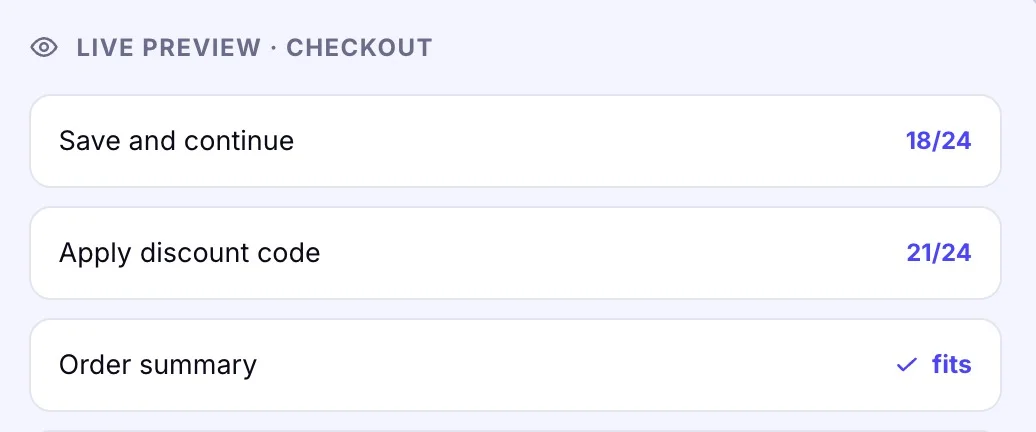
Set a max length per key and watch a live counter as you type. Strings that would overflow a control or truncate in a menu are flagged before the build.
A rendered preview updates as you translate, catching wrapping, truncation and awkward line breaks instantly instead of after a screenshot review.
Link your repo, Figma file or design system in a couple of clicks.
Every key is bound to the screen and element it renders in.
Translators see length, tone and layout live as they type.
Ship copy that fits the first time, on every breakpoint.
No. The visual preview runs in the browser, so anyone on the team sees exactly how a string renders without opening Figma or the codebase.
Each string inherits the character budget of the element it lives in. WordBeam warns the moment a translation would overflow a button, label or tab.
Yes. Arabic, Hebrew and other RTL scripts render in a mirrored preview so directionality and alignment are correct before you publish.
Hosted UI strings can be edited and published instantly. For bundled strings, changes sync back to your repo on the next release.